




Intent: compare leading interactive touchscreen kiosk software platforms for 2026. Schools, museums, universities, and organizations implementing interactive displays face a critical decision: which software platform will deliver intuitive visitor experiences, sustainable content management, and reliable operation through years of daily public use? The platform you select determines whether your touchscreen investment becomes an engagement asset that strengthens community connections or a technical burden consuming administrative resources while disappointing stakeholders.
The interactive touchscreen kiosk software market has matured considerably, offering diverse solutions ranging from specialized recognition platforms designed specifically for institutional applications to general-purpose authoring tools adapted for kiosk deployment. Each platform brings distinct capabilities, pricing structures, learning curves, and support models that significantly impact long-term success.
This comprehensive comparison examines nine leading interactive touchscreen kiosk software platforms based on features, ease of use, pricing, institutional fit, and long-term sustainability. Whether you’re selecting software for athletic recognition displays, donor walls, campus directories, museum exhibits, or visitor information systems, this analysis provides the detailed information needed to make informed decisions matching your organization’s specific requirements and capabilities.
Selecting appropriate interactive touchscreen kiosk software requires evaluating technical capabilities alongside practical considerations including administrative complexity, ongoing costs, vendor support quality, and alignment with institutional needs. The platforms explored here serve different organizational contexts, with some excelling for recognition-focused applications while others suit interactive exhibits or general digital signage deployments.

Modern interactive kiosk software enables intuitive visitor engagement through touchscreen interfaces requiring no training or technical expertise
Understanding Interactive Touchscreen Kiosk Software
Before comparing specific platforms, understanding what distinguishes effective touchscreen kiosk software from basic digital signage solutions helps organizations evaluate which capabilities matter most for their applications.
Core Capabilities Distinguishing Kiosk Software
Interactive Navigation and Search
True touchscreen kiosk software enables visitors to explore content through intuitive navigation, filtering, and search rather than passively viewing predetermined sequences. Comprehensive search functionality allowing visitors to find specific people, achievements, or information, category filtering enabling focused exploration of relevant content, alphabetical and chronological browsing accommodating different discovery preferences, and responsive touch interfaces providing smartphone-like interaction patterns all represent essential capabilities.
Organizations implementing interactive kiosk solutions report that search and filtering features dramatically increase visitor engagement compared to static displays with predetermined content sequences.
Content Management and Administration
Sustainable operation requires straightforward content management enabling non-technical administrators to update displays confidently. Web-based administrative interfaces accessible from any device without requiring physical display access, template-based content creation streamlining consistent profile and page development, bulk import capabilities accelerating historical content migration, scheduled publishing automating time-sensitive updates, and multi-user access with role-based permissions supporting distributed responsibility all separate professional platforms from basic slideshow software.
The difference between platforms that organizations can manage independently versus those requiring ongoing vendor dependency significantly impacts total cost of ownership and operational flexibility.
Accessibility and Inclusive Design
All interactive displays must serve diverse audiences regardless of ability. WCAG 2.1 AA compliance ensuring readability and navigation for users with visual impairments, adjustable text sizing accommodating varied visual needs, high-contrast modes improving visibility, screen reader compatibility enabling non-visual access, and keyboard navigation alternatives to touch interaction represent baseline accessibility requirements.
Beyond technical compliance, effective platforms make accessibility features easy to implement rather than requiring specialized expertise many organizations lack.
Platform Categories and Use Cases
Recognition-Focused Platforms
Specialized software designed specifically for athletic halls of fame, donor recognition, academic achievement showcases, and alumni acknowledgment typically offers purpose-built features including profile templates optimized for individual and team recognition, automatic ranking and sorting by achievement level or contribution, giving tier organization for donor displays, championship and awards categorization, and integration with athletic statistics and fundraising systems.
These focused platforms trade generalized flexibility for optimized workflows serving institutional recognition needs efficiently.
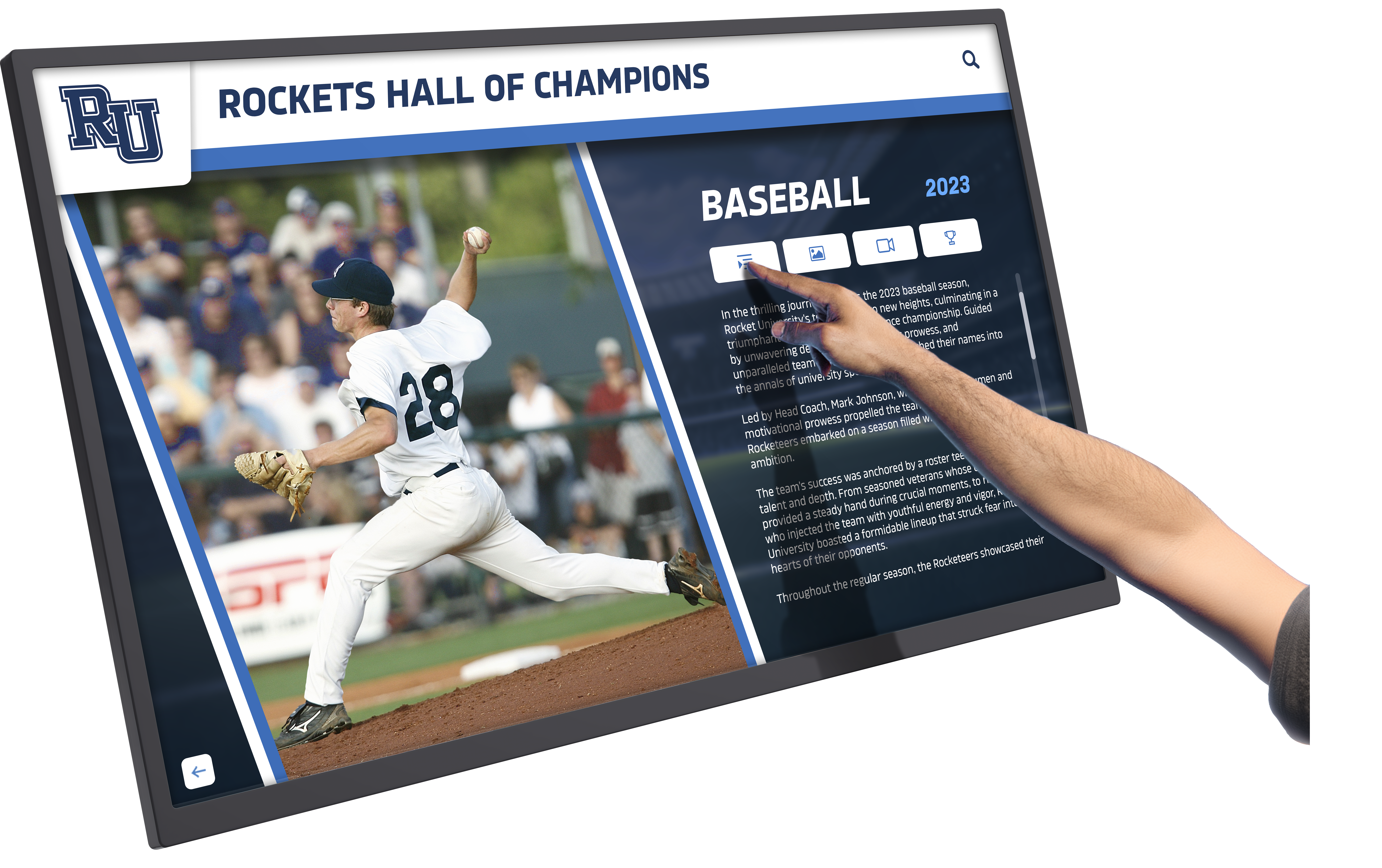
Recognition-focused software provides optimized interfaces for exploring athlete profiles, statistics, and achievement details
General Interactive Experience Platforms
Broader authoring tools enable custom interactive experiences across diverse applications from museum exhibits to retail kiosks to corporate lobbies. These platforms emphasize design flexibility, multimedia integration, sensor and device connectivity, complex interaction logic, and cross-platform deployment across different hardware and operating systems.
General platforms require more design expertise but enable highly customized experiences impossible with template-based recognition systems.
Digital Signage with Touch Extensions
Many digital signage platforms have added touchscreen capabilities to core broadcast-focused products. These solutions excel at scheduled content rotation, multi-screen management, emergency messaging, and standard signage applications, with touch functionality often representing secondary features rather than core strengths.
Organizations should carefully evaluate whether touch features in signage-focused platforms match the sophistication of platforms designed primarily for interactive kiosk applications.
1. Rocket Alumni Solutions: Best for Recognition-Focused Applications
Rocket Alumni Solutions represents the most comprehensive platform specifically designed for schools, universities, and organizations implementing interactive recognition displays including athletic halls of fame, donor walls, academic achievement showcases, and sponsor acknowledgment.
Key Strengths
Purpose-Built Recognition Features
Unlike general kiosk software adapted for recognition applications, Rocket Alumni Solutions builds recognition workflows into core platform architecture. Pre-configured templates for individual athletes, teams, donors, students, faculty, and sponsors streamline content creation without requiring custom design for every profile. Automatic ranking and sorting by season, achievement level, giving tier, or graduation year eliminates manual organization. Unlimited capacity accommodates decades of recognition across multiple categories without space constraints or performance degradation.
These purpose-built capabilities enable schools and organizations to launch comprehensive recognition displays in weeks rather than months required by platforms demanding custom development for every element.
Cloud-Based Management Simplicity
Organizations consistently report that management simplicity represents Rocket’s most significant advantage. The web-based content management system requires no software installation or technical training, enabling designated administrators across athletics, development, academics, and student life to manage relevant content independently. Role-based permissions prevent conflicts while enabling appropriate access. Mobile accessibility allows updates from smartphones and tablets, not just desktop computers.
Schools implementing Rocket report same-day content updates compared to weeks waiting for vendor changes with platforms lacking self-service management capabilities.
WCAG 2.1 AA Accessibility Compliance
Rocket Alumni Solutions achieves full WCAG 2.1 AA accessibility compliance out of the box rather than requiring organizations to implement accessibility features themselves. Adjustable text sizing, high-contrast modes, screen reader compatibility, and keyboard navigation alternatives come standard. QR codes enable mobile device access extending recognition beyond physical displays for users unable to approach wall-mounted screens.
This built-in compliance eliminates the accessibility expertise barriers many organizations face when implementing public interactive displays.
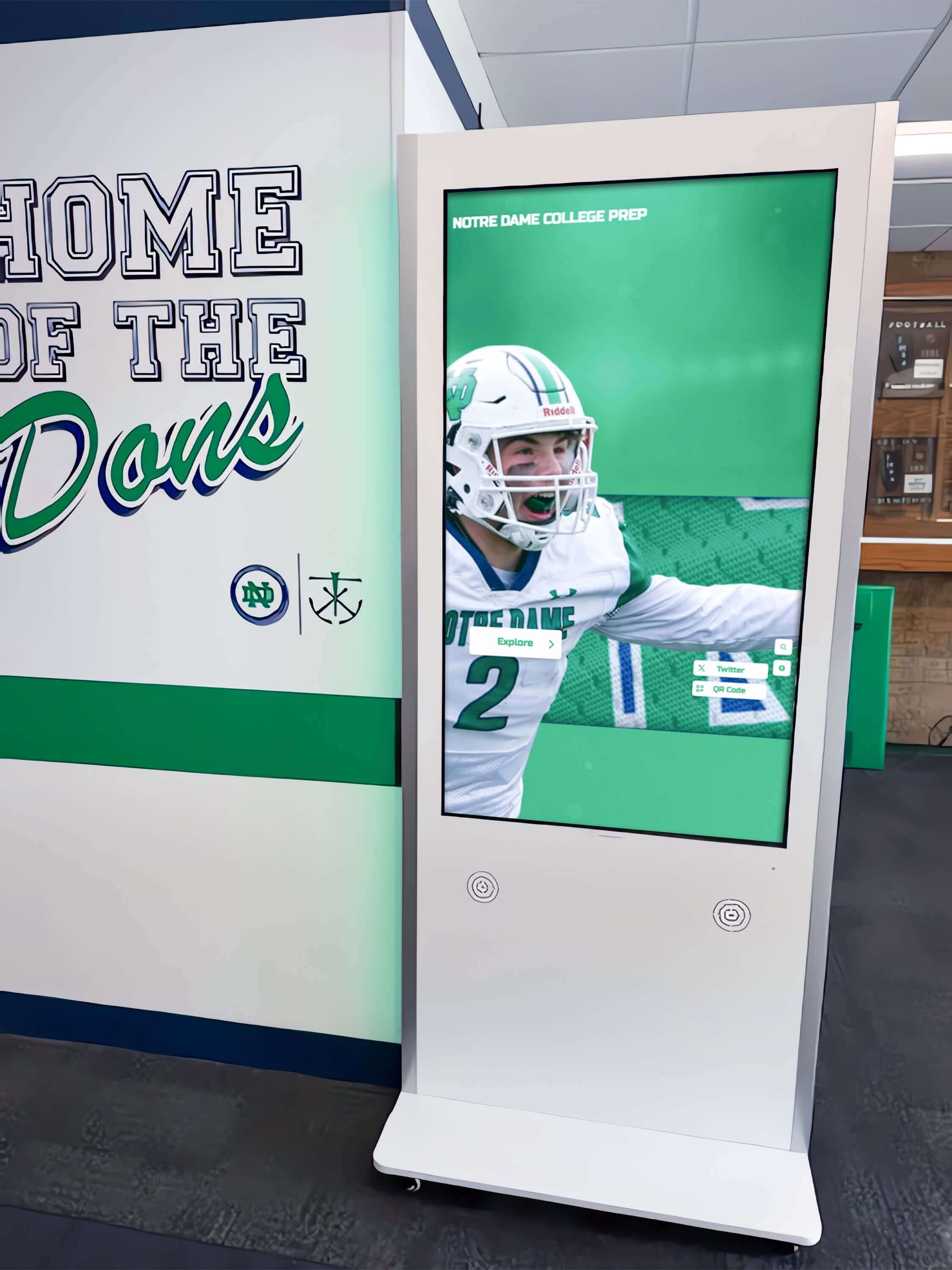
Strategic placement of recognition-focused kiosks in athletic areas provides natural engagement opportunities celebrating team and individual achievements
Comprehensive Implementation Support
Rocket provides turnkey implementation including hardware consultation and procurement, custom branded interface design, initial content migration and setup, administrator training and documentation, and ongoing technical support with guaranteed response times. This comprehensive service model eliminates the coordination complexity of managing separate vendors for hardware, software, design, content development, and support.
Organizations report that integrated service significantly accelerates deployment while reducing technical risk compared to self-implemented solutions requiring in-house expertise across multiple domains.
Limitations to Consider
Rocket Alumni Solutions optimizes for recognition applications rather than serving as general-purpose interactive experience authoring tools. Organizations requiring highly customized interactions, sensor integration, or non-recognition applications may find specialized platforms more appropriate. The focus on institutional recognition means the platform may not suit retail, hospitality, or other commercial kiosk applications.
Pricing and Value
While Rocket typically costs more than basic digital signage with touch features, the specialized capabilities, included implementation services, and unlimited content capacity deliver strong value for recognition-focused applications. According to the Rocket Alumni Solutions website, pricing includes software licensing, cloud hosting, updates, and support in annual subscriptions rather than requiring large upfront enterprise license fees.
Organizations can expect total investment including hardware, software, and implementation ranging from $10,000-$30,000 for single-display systems, with additional displays adding incremental costs significantly lower than first installations.
Best Suited For
Rocket Alumni Solutions represents the optimal choice for schools, universities, athletic departments, and nonprofit organizations implementing interactive recognition displays including digital trophy cases, athletic halls of fame, donor recognition walls, academic achievement showcases, and sponsor acknowledgment systems requiring straightforward management by non-technical staff.
2. Intuiface: Best for Complex Interactive Experiences
Intuiface positions itself as an audience engagement platform enabling sophisticated interactive experiences without coding, serving over 1,500 customers across 70+ countries with ISO 27001 certification.
Key Strengths
No-Code Interactive Design
Intuiface provides visual design tools enabling complex interactions without programming expertise. Drag-and-drop interface building, extensive gesture support including swipe, pinch, rotate, and multi-touch, conditional logic and branching navigation, animation and transition effects, and data binding to external sources all occur through graphical interfaces rather than code.
This no-code approach makes sophisticated interactive experiences accessible to designers and content creators rather than requiring software developers for every implementation.
Extensive Integration Capabilities
Intuiface excels at connecting interactive displays to external systems and devices. Comprehensive API support enables integration with web services, databases, and business systems. IoT device connectivity including sensors, RFID readers, and physical computing platforms extends interactivity beyond touchscreens. Computer vision capabilities enable gesture and object recognition. Voice control integration adds speech as an interaction modality.
These extensive connectivity options enable custom experiences impossible with more constrained recognition-focused platforms.
Platform Flexibility
Intuiface supports deployment across diverse hardware and operating systems including Windows, BrightSign, iOS/iPad, Android, Raspberry Pi, Chrome OS, Samsung SSP, Samsung Kiosk, Displax, and web. This hardware agnosticism provides flexibility to select optimal displays and computing platforms for specific contexts rather than limiting hardware choices based on software compatibility.
Organizations can standardize on Intuiface across installations using different hardware based on budget, form factor, or technical requirements.
Limitations to Consider
Intuiface’s powerful capabilities come with significant complexity requiring substantial design and technical expertise. Organizations without dedicated design resources or technical staff may struggle with implementation and content development. The platform serves general interactive experience creation rather than optimizing for specific applications like recognition displays, meaning template libraries and purpose-built workflows must be created from scratch.
Pricing starts at $60 per month per device for basic features, with enterprise deployments reaching several thousand dollars annually. Premium pricing reflects extensive capabilities but may exceed budgets for straightforward recognition applications served equally well by more focused platforms.
Best Suited For
Intuiface suits agencies, museums, large institutions, and organizations with dedicated design and technical resources creating custom interactive experiences requiring sophisticated interactions, external system integration, or deployment across diverse hardware platforms. The platform excels for installations where interaction design represents a differentiating factor rather than simply providing access to recognition content.
3. Pandasuite: Best for Offline Multimedia Experiences
Pandasuite specializes in creating custom interactive experiences optimized for completely offline operation across touchscreen kiosks, tablets, and multi-device applications.
Key Strengths
100% Offline Operation
Pandasuite designs all content for complete offline functionality with all media embedded locally in applications. This architecture eliminates dependencies on network connectivity ensuring reliable 24/7 operation regardless of internet availability. The platform particularly suits remote locations, traveling exhibits, or installations where network infrastructure remains unreliable or unavailable.
Organizations implementing exhibits, showrooms, or public kiosks in environments with connectivity concerns benefit significantly from Pandasuite’s offline-first design.
Visual Drag-and-Drop Authoring
Pandasuite Studio provides entirely visual design tools requiring no coding expertise. Screen design, interactive component placement, animation definition, and behavior connection all occur through intuitive graphical interfaces. Rich interaction support including swipe, pinch, hotspots, animations, and conditional logic creates engaging experiences without technical expertise.
The approachable design tools make Pandasuite accessible to content creators and designers rather than requiring software development resources.
Cross-Platform Deployment
Pandasuite applications deploy across Windows, Android, and iOS platforms from single design projects. Organizations can create content once and deploy to different hardware based on installation requirements. Export options include standalone Windows EXE files, Android APK packages, and iOS applications suitable for tablets and large-format touchscreens.
Over-the-air update capabilities enable remote content updates without physical device access once connectivity becomes available.
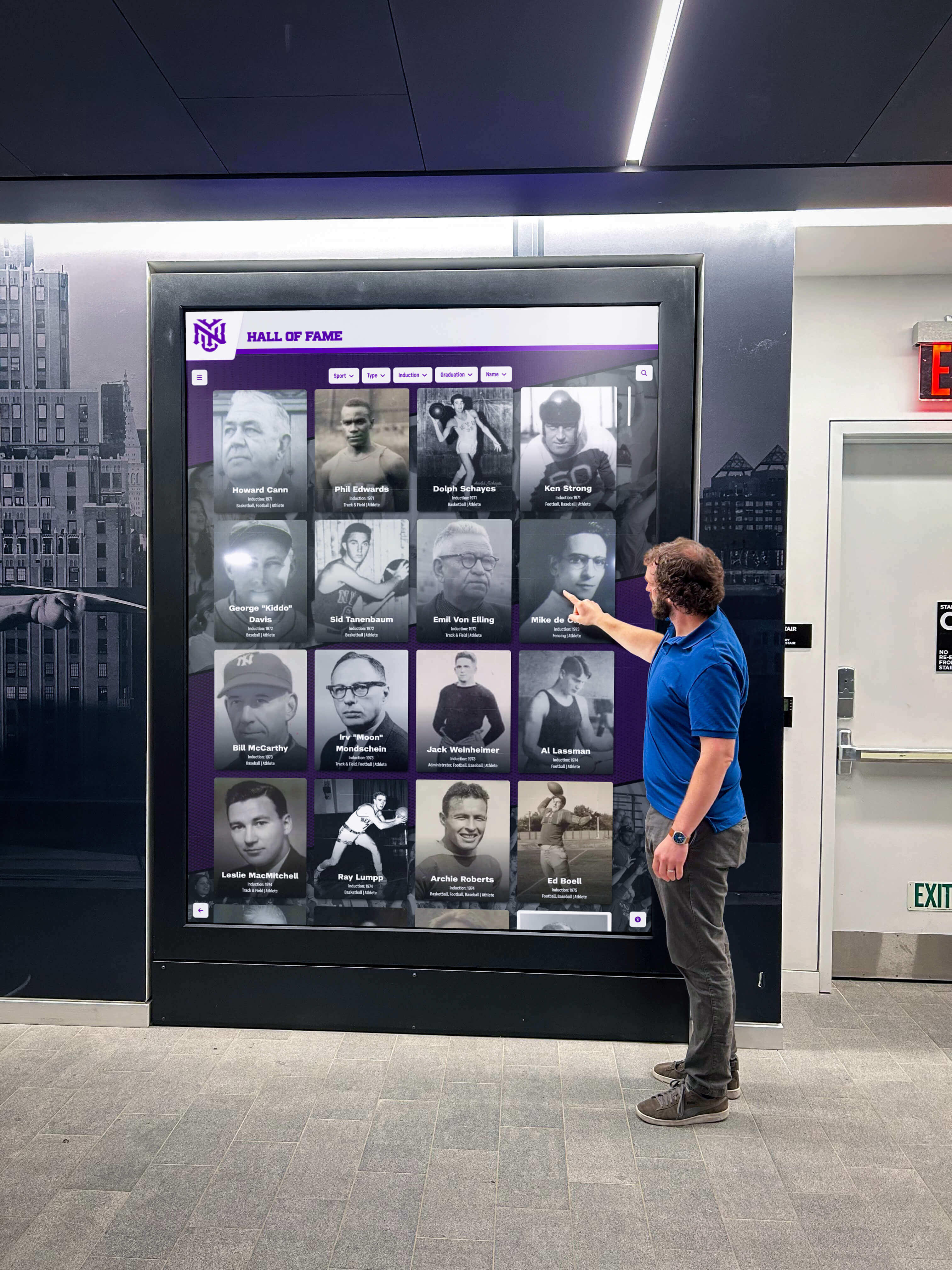
Intuitive interfaces encourage spontaneous interaction as visitors explore recognition content and institutional information
Limitations to Consider
While Pandasuite excels for multimedia interactive exhibits and experiences, the platform lacks recognition-specific features including profile templates, automatic ranking, donor tier organization, or athletic statistics integration. Every recognition display requires custom design and development rather than leveraging purpose-built workflows.
The offline-first architecture, while beneficial for certain contexts, adds complexity for installations with reliable connectivity where cloud-based content management provides administrative advantages. Organizations should assess whether offline operation represents a genuine requirement rather than an unnecessary constraint limiting management flexibility.
Best Suited For
Pandasuite serves museums, exhibitions, showrooms, retail environments, and traveling exhibits requiring completely offline interactive experiences with sophisticated multimedia and animations. The platform suits organizations with design resources creating custom interactive content rather than those seeking recognition-specific templates and workflows.
4. Novisign: Best for Digital Signage with Touch Features
Novisign provides digital signage software recognized as powering over 60,000 screens globally, with interactive touch capabilities added to core broadcast-focused functionality.
Key Strengths
Established Digital Signage Platform
Novisign brings mature digital signage capabilities to interactive kiosk applications. Multi-screen management at scale, scheduled content rotation and playlists, emergency messaging and alert capabilities, remote monitoring and control, and extensive media format support represent core strengths developed for traditional digital signage applications.
Organizations already using Novisign for digital signage can extend their existing platform to include interactive touchscreen applications rather than implementing separate systems.
Touch Widget Integration
The Touch Widget enables interactive kiosk experiences within digital signage content by defining clickable areas triggering different content. This approach provides basic interactivity for wayfinding, information access, and content navigation without requiring complex interactive authoring.
Touch functionality works offline once content is cached locally, supporting installations without constant internet connectivity.
Broad Hardware Compatibility
Novisign supports Android and Windows player applications across diverse hardware from 7-inch tablets to 98-inch professional displays. This flexibility enables organizations to select appropriate hardware for specific contexts based on budget, form factor, and technical requirements rather than limiting choices based on software compatibility.
Limitations to Consider
Novisign’s interactive capabilities remain more limited than platforms designed primarily for touchscreen kiosk applications. The Touch Widget provides basic interactivity but lacks sophisticated navigation, search, filtering, and data management features recognition displays require.
The platform optimizes for content broadcasting to multiple screens rather than deep interactive experiences on individual displays. Organizations should carefully evaluate whether touch features match requirements for recognition applications demanding comprehensive search, filtering, and profile management.
Best Suited For
Novisign serves organizations already using the platform for digital signage who want to add basic touch interactivity to some installations, or those implementing simple wayfinding and information kiosks requiring limited interaction rather than comprehensive recognition databases.
5. Touchpros: Recognition-Focused with Service Emphasis
Touchpros offers TouchWall interactive recognition software designed specifically for halls of fame and achievement displays, emphasizing turnkey service including content development and ongoing support.
Key Strengths
Recognition-Specific Design
According to the Touchpros website, TouchWall provides user-friendly interfaces for community recognition and awards with cloud-based updates and pre-made templates. The software focuses specifically on athletic, academic, and community recognition applications rather than general interactive kiosk use cases.
Purpose-built templates and workflows streamline recognition content creation similar to specialized platforms like Rocket Alumni Solutions.
Comprehensive Content Services
Touchpros distinguishes itself by offering extensive services to scan, upload photos, and enter associated data into TouchWalls. This service emphasis appeals to organizations lacking internal resources or time for content development, effectively outsourcing implementation complexity to the vendor.
The service model trades internal control for vendor-managed implementation potentially accelerating deployment while reducing internal burden.
Scalability and Flexibility
Multiple touchscreen displays can be added with no additional software cost according to available information. Organizations can increase touchscreen sizes or add additional displays as needs grow, with flexibility to add upgrades at any time.
Custom tabs enable organizations to structure content around Activities, Academics, Fine Arts, or other categories relevant to unique institutional contexts.
Limitations to Consider
Limited public information exists about Touchpros’ pricing, specific technical capabilities, accessibility features, or implementation details compared to competitors with more transparent documentation. The service-heavy model may create vendor dependency limiting flexibility compared to platforms enabling complete self-service management.
Organizations should carefully evaluate whether outsourced content management aligns with their operational model versus platforms enabling independent administration by internal staff.
Best Suited For
Touchpros serves schools and organizations seeking recognition-focused software with comprehensive implementation and content services, particularly those lacking internal resources for content development and ongoing management.
6. Arreya: Chrome-Optimized Digital Signage
Arreya provides cloud-based digital signage software with interactive touchscreen capabilities, distinguished by Google’s selection as a Chrome Enterprise Recommended solution.
Key Strengths
Google Chrome Enterprise Integration
As the only digital signage solution recommended by Google for Chrome Enterprise, Arreya offers optimized performance on Chrome OS devices. Organizations standardized on Google ecosystem technologies gain integration advantages and vendor support relationships.
This Chrome optimization particularly benefits institutions already using Google Workspace, Chromebooks, and Chrome-based infrastructure seeking consistent technology stacks.
Drag-and-Drop Content Creation
The Arreya editor includes widgets, templates, unlimited media storage, and touchscreen capabilities accessible through drag-and-drop interfaces requiring no coding expertise. This visual authoring approach makes content creation accessible to non-technical administrators.
Organizations can create interactive touchscreen content using familiar design paradigms rather than learning specialized programming languages or complex authoring tools.
Fabrication and Hardware Services
According to available information, Arreya is the only US vendor providing custom fabricated enclosures and displays in-house. This vertical integration potentially simplifies procurement and vendor coordination by combining software, hardware, and physical enclosure manufacturing with single supplier relationships.
Organizations valuing integrated hardware and software solutions from unified vendors may find this comprehensive offering advantageous.

Effective interactive kiosk software enables extended engagement as visitors explore detailed profiles and achievement histories
Limitations to Consider
Like other platforms originally designed for digital signage, Arreya’s interactive capabilities may prove less sophisticated than software built primarily for touchscreen kiosk applications. Organizations should carefully evaluate whether touch features match requirements for complex recognition displays requiring comprehensive search, filtering, and data management.
Limited public information exists about recognition-specific features, templates, accessibility compliance, or specialized workflows compared to purpose-built recognition platforms.
Best Suited For
Arreya serves organizations already invested in Google Chrome Enterprise ecosystems implementing wayfinding kiosks, donor walls, digital messaging, and campus signage requiring basic touch interactivity integrated with broader digital signage deployments.
7-9. Specialized Niche Solutions
Three additional platforms serve very specific recognition applications with highly focused capabilities:
Halloffamewall.com
Specialized software focusing specifically on athletic hall of fame displays with extremely easy setup and operation. The platform sacrifices flexibility and broad feature sets for streamlined workflows serving athletic recognition exclusively. Best for schools implementing athletic-only recognition without requirements for donor walls, academic achievement, or broader applications.
Touchwall.us
Another niche platform emphasizing simple operation and high-quality athletic recognition displays. Limited public documentation makes comprehensive evaluation difficult, but available information suggests focus on straightforward hall of fame applications rather than complex multi-category recognition or general interactive kiosk uses.
Donorswall.com
Purpose-built software designed exclusively for donor recognition applications serving nonprofits, educational institutions, and healthcare organizations. The focused donor-specific functionality includes giving tier management, campaign organization, and philanthropic acknowledgment workflows optimized for development offices.
Organizations implementing donor-only recognition without athletic, academic, or other recognition needs may find specialized platforms simpler than comprehensive solutions requiring configuration for contexts beyond core requirements.
Selection Framework: Matching Platforms to Requirements
Choosing appropriate interactive touchscreen kiosk software requires systematic evaluation aligning platform capabilities with organizational needs, technical resources, and long-term sustainability requirements.
Define Primary Use Cases
Recognition-Focused Applications
Organizations implementing digital halls of fame, donor walls, academic achievement displays, or sponsor acknowledgment should prioritize platforms specifically designed for recognition applications. Purpose-built templates, automatic organization, profile management workflows, and unlimited capacity represent critical capabilities.
Rocket Alumni Solutions, Touchpros, and specialized niche platforms optimize for recognition applications while general platforms like Intuiface and Pandasuite require significantly more design work to achieve similar recognition-focused functionality.
Custom Interactive Experiences
Museums, exhibitions, retail environments, and corporate installations requiring unique interactive experiences with multimedia, animations, sensor integration, or custom interaction logic benefit from flexible authoring platforms. The design freedom and integration capabilities general platforms provide enable experiences impossible with recognition-focused template systems.
Intuiface and Pandasuite excel for custom experiences where interaction design represents a differentiating factor rather than simply providing content access.
Basic Information and Wayfinding
Organizations implementing campus directories, wayfinding kiosks, event calendars, or simple information access may find digital signage platforms with touch features sufficient for basic interactivity. The lower costs and familiarity of digital signage tools makes them attractive for straightforward applications.
Novisign and Arreya serve basic touch-enabled information kiosks adequately while costing less than specialized recognition platforms or premium authoring tools.
Assess Technical Resources and Capabilities
Self-Service Management Priority
Organizations requiring independent content management without vendor dependency should prioritize platforms with intuitive web-based administration enabling non-technical staff to confidently update content. Cloud-based systems accessible from any device eliminate software installation and provide flexibility.
Rocket Alumni Solutions emphasizes straightforward self-service management while platforms like Intuiface and Pandasuite require more technical expertise for ongoing content development.

Card-based navigation interfaces provide intuitive content exploration familiar from smartphone and tablet experiences
Design and Development Resources
Organizations with dedicated design staff, technical expertise, or agencies supporting implementation can leverage powerful authoring platforms requiring specialized skills. The design freedom and sophisticated capabilities justify higher learning curves when expertise exists.
Organizations lacking design resources should prioritize platforms with templates, straightforward workflows, and comprehensive implementation support minimizing internal expertise requirements.
Service and Support Expectations
Some organizations prefer comprehensive turnkey services including hardware consultation, content development, training, and ongoing support from unified vendors. Others prioritize cost savings through self-implementation accepting responsibility for coordination and technical problem-solving.
Platforms like Rocket Alumni Solutions and Touchpros emphasize comprehensive services while tools like Novisign and open-source solutions require more self-service implementation.
Evaluate Accessibility Requirements
All public interactive displays must serve visitors regardless of ability. Organizations should verify that selected platforms achieve WCAG 2.1 AA compliance rather than requiring manual implementation of accessibility features.
Rocket Alumni Solutions provides built-in accessibility compliance while many platforms require organizations to implement accessible design independently—a significant expertise barrier for many schools and nonprofits lacking specialized knowledge.
Organizations implementing interactive touchscreen displays should prioritize platforms making accessibility straightforward rather than optional advanced features requiring specialized implementation.
Consider Total Cost of Ownership
Beyond initial software licensing, comprehensive budgets include hardware, implementation services, training, ongoing support, content updates, and eventual hardware replacement. Comparing platforms requires evaluating complete five-year costs rather than focusing exclusively on monthly software fees.
Initial Investment Components
Software licensing costs ranging from hundreds to thousands of dollars annually, hardware including displays and computing systems typically representing the largest single expense, professional installation including mounting, power, and networking, initial content development and migration, administrator training and documentation, and custom design work for branded interfaces all contribute to implementation budgets.
Organizations should request comprehensive quotes including all components rather than evaluating software costs in isolation from implementation realities.
Ongoing Operational Costs
Annual software subscription renewals or maintenance fees, content management and updates either through internal staff time or contracted services, technical support and troubleshooting assistance, hardware maintenance and repairs, and eventual display replacement after 5-7 years of operation all represent ongoing costs affecting total ownership economics.
Platforms with lower initial costs but requiring extensive ongoing vendor services may prove more expensive long-term than systems with higher upfront investment but complete self-service management capabilities.
Implementation Considerations Beyond Software Selection
Successful interactive kiosk deployments require attention to factors beyond software capabilities:
Hardware Compatibility and Selection
Verify that selected software supports preferred hardware platforms before procurement. Some platforms work exclusively with specific display manufacturers or computing systems while others offer broad hardware compatibility. Organizations standardizing on particular display brands should confirm software support before committing to platforms.
Commercial-grade displays designed for continuous operation dramatically outperform consumer televisions in public deployment scenarios. According to touchscreen industry standards, commercial displays in 24/7 public use last 2-3 times longer than consumer models while maintaining consistent touch responsiveness and image quality.
Network Infrastructure Requirements
Cloud-based platforms require reliable internet connectivity for content updates and remote management. Assess network availability at planned installation locations before selecting platforms dependent on connectivity. Some displays will connect via WiFi while others require wired Ethernet based on institutional network security policies.
Platforms offering offline content caching provide operational resilience if network connectivity proves intermittent while still enabling remote management when networks function normally.
Content Development Planning
Organizations consistently underestimate content development time and effort required for comprehensive recognition displays. Digital recognition display implementation requires gathering historical information, digitizing photographs, writing biographical content, verifying statistics, and organizing achievements—substantial work regardless of selected software.
Platforms with bulk import capabilities, content services, or simplified workflows significantly reduce initial development burden compared to systems requiring manual entry for every profile and achievement.
Training and Change Management
Technology succeeds only when designated administrators understand and embrace it. Allocate time for administrator training ensuring staff can confidently manage content without constant vendor assistance. Platforms with intuitive interfaces and comprehensive documentation reduce training requirements compared to complex systems demanding specialized expertise.
Establish clear content management responsibilities with defined accountability preventing displays from becoming outdated when no one accepts ownership for ongoing updates.
Implement Interactive Recognition That Engages Your Community
Discover how purpose-built interactive touchscreen software designed specifically for schools, universities, and organizations simplifies recognition display implementation while delivering superior visitor experiences. Explore platforms offering unlimited capacity, straightforward management, accessibility compliance, and comprehensive support—eliminating technical barriers while celebrating achievements that strengthen community connections.
Explore Interactive Recognition SolutionsComparative Summary: Platform Strengths and Ideal Contexts
This comparison table summarizes the primary strengths and optimal use cases for each platform:
| Platform | Best For | Key Strengths | Primary Limitations |
|---|---|---|---|
| Rocket Alumni Solutions | Recognition displays (athletic, donor, academic) | Purpose-built recognition features, cloud management simplicity, WCAG 2.1 AA accessibility, comprehensive implementation support | Optimized for recognition rather than general kiosk applications |
| Intuiface | Complex custom interactive experiences | No-code design flexibility, extensive integration capabilities, broad hardware support | Significant complexity, higher costs, requires design expertise |
| Pandasuite | Offline multimedia exhibits | 100% offline operation, visual authoring, cross-platform deployment | Lacks recognition-specific features, offline-first architecture adds complexity when not required |
| Novisign | Digital signage with basic touch | Mature signage platform, multi-screen management, broad compatibility | Limited interactive capabilities, optimized for broadcast rather than deep interaction |
| Touchpros | Recognition with comprehensive services | Recognition-specific design, content development services, scalable deployment | Limited public information, service model may create vendor dependency |
| Arreya | Chrome Enterprise environments | Google integration, drag-and-drop design, integrated hardware options | Signage-focused with limited recognition features |
| Niche Solutions | Single-purpose applications | Extremely focused workflows, simple operation | Limited flexibility beyond specific use cases |
Future Trends in Interactive Kiosk Software
Understanding emerging developments helps organizations select platforms remaining relevant through coming years:
Artificial Intelligence Integration
AI capabilities increasingly enhance touchscreen experiences through natural language search understanding conversational queries rather than requiring exact keywords, personalized content recommendations based on interaction patterns, automated content suggestions identifying recognition gaps, and voice interfaces complementing touch interaction.
Early implementations show promise though privacy considerations require careful attention in institutional contexts serving public audiences.
Mobile Device Integration
Smartphone integration extends kiosk experiences beyond fixed installations through QR codes linking physical displays to mobile viewing, responsive web interfaces providing access from personal devices, social sharing amplifying recognition visibility, and augmented reality overlays connecting physical and digital content.
The boundary between fixed touchscreen kiosks and mobile apps continues blurring as platforms provide unified experiences across interaction modalities.
Enhanced Multimedia Capabilities
Video content, 3D models, virtual reality integration, and interactive timelines create more engaging storytelling compared to static text and images. Platforms supporting rich multimedia enable institutions to celebrate achievements through compelling formats impossible with traditional physical recognition.
Organizations should assess whether selected platforms support multimedia features matching long-term content ambitions rather than limiting future possibilities through current technical constraints.
Conclusion: Selecting Software Matching Your Institution’s Needs
Interactive touchscreen kiosk software selection significantly impacts whether your displays become valuable engagement assets or technical burdens consuming resources while disappointing stakeholders. The platforms explored here serve different organizational contexts, with some optimizing for recognition-focused applications while others enable general interactive experiences or extend digital signage systems.
For schools, universities, athletic departments, and organizations implementing recognition displays including digital trophy cases, halls of fame, donor walls, and achievement showcases, specialized platforms like Rocket Alumni Solutions deliver purpose-built features, straightforward management, accessibility compliance, and comprehensive support enabling successful deployments by non-technical administrators. The focused recognition capabilities justify investment for institutions prioritizing sustainable long-term operation over generalized flexibility.
Organizations requiring custom interactive experiences with unique design, sophisticated interactions, sensor integration, or multimedia presentations benefit from powerful authoring platforms like Intuiface or Pandasuite offering design freedom enabling distinctive experiences. The technical expertise requirements and higher costs match value delivered when interaction design represents a competitive differentiator.
Institutions implementing basic wayfinding, information kiosks, or extending existing digital signage deployments may find platforms like Novisign or Arreya sufficient for straightforward touch-enabled applications without requiring specialized recognition features or premium authoring capabilities.
The critical insight guiding successful selection involves matching platform capabilities to actual requirements and organizational capacity rather than selecting the most feature-rich or technically sophisticated option regardless of fit. The best software combines appropriate capabilities for your specific use cases, administrative complexity matching available expertise, and sustainable total cost of ownership aligned with long-term budgets.
Organizations investing in interactive touchscreen displays deserve software enabling success rather than creating technical obstacles. Whether your institution prioritizes turnkey recognition display implementation, custom interactive experience development, or basic touch-enabled information access, appropriate platforms exist serving each context when selection considers genuine requirements rather than vendor marketing claims.
Ready to implement interactive recognition displays that engage your community without overwhelming administrative resources? Explore how Rocket Alumni Solutions delivers purpose-built software designed specifically for schools and organizations celebrating athletic achievements, donor contributions, and academic excellence through touchscreen displays combining unlimited capacity, cloud-based management, accessibility compliance, and comprehensive support ensuring successful long-term operation.
Comparative Content Disclaimer: This comparison is based on publicly available information as of March 2026. All product names and trademarks belong to their respective owners. Comparative statements reflect Rocket Alumni Solutions’ interpretation of available data and may change over time. Rocket Alumni Solutions is not affiliated with or endorsed by Intuiface, Pandasuite, Novisign, Touchpros, or Arreya.
Sources:































